
Settings is where you make Math Workout yours: how long a workout is, how the keypad looks, the theme, the language and the sound.
How do I open Settings?
On the home screen, tap the gear at the bottom right of the big title card (bottom left in Arabic and Urdu). On a computer there is also a Settings item at the foot of the left-hand menu. To go back, use the back arrow at the top of Settings, your device's Back button, or Esc on a keyboard.
What can I change in Settings?
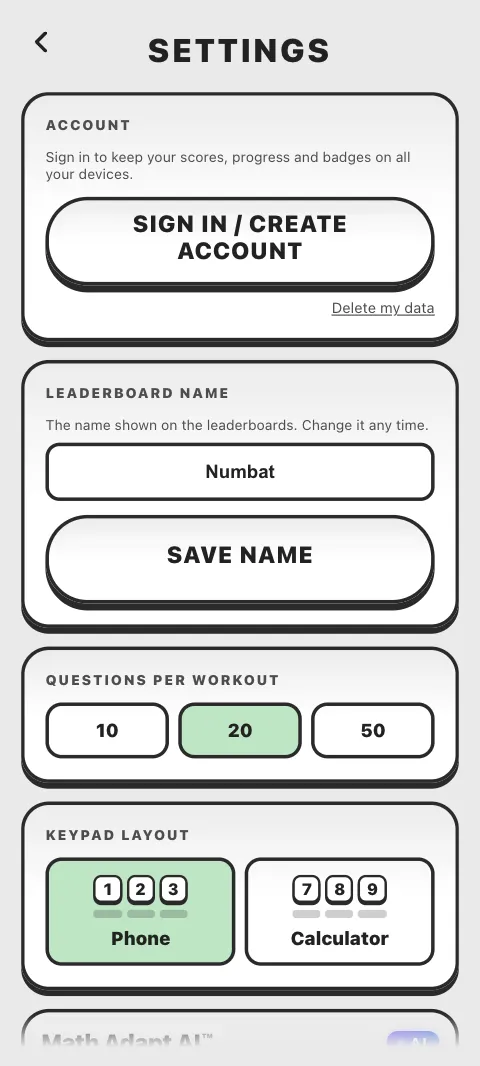
The cards, from the top:
- Account: sign in, sync, sign out or delete your account. See Why sign in?
- Leaderboard name: the name others see on the boards. See Change your leaderboard name
- Questions per workout: 10, 20 or 50
- Keypad layout: Phone or Calculator
- Math Adapt AI: the level of each classic workout. See Math Adapt AI and difficulty levels
- Theme: 12 colours and 10 patterns
- Language: 15 languages. See Change the language
- Sound: Sound Effects, Music, Doc's voice (in English), Celebrations, and Reminders in the Android app
- Computer: only on a computer, see below
- Math Workout Pro: go Pro, or enter a code. See What Pro includes
- What's new: the notes from recent updates
- Invite a friend: share Math Workout
How do I change the number of questions in a workout?
Choose 10, 20 or 50 on the Questions per workout card. A new player gets 20. It sets the length of Add & Subtract, Multiply & Divide and I'm Feeling Clever. Times Table Master always asks 12 questions for each table you pick.
How do I get a calculator style keypad (7 8 9 on top)?
On the Keypad layout card, choose Calculator. The number keys then run 7 8 9 along the top row, like a calculator, instead of 1 2 3 like a phone. The bottom row, with delete, 0 and clear, stays where it is. Every number keypad in the app changes: the workouts, World Challenge, Mental Math Master, The Brain Cruncher, Brain Age Check, Galaxy Run on a touch screen, Method Lab and more.
In Arabic and Urdu the keypads read right to left, so they appear mirrored. This setting stays on the device you set it on.
How do I change the theme or turn on dark mode?
The Theme card has two rows that you can swipe: Colours and Patterns, 22 themes in all. Tap one to use it. Dark is the second colour, and it is always free, as is Classic.
Without Pro you can switch to any other theme twice. After that the others show a padlock, and the card says Unlock all themes with Pro. The theme you are using stays yours. With Pro every theme is open.
How do I turn off the sound or the music?
On the Sound card, Sound Effects and Music are separate switches:
- Sound Effects covers the game sounds, the chime for a right answer and the jingles.
- Music covers the menu music and the music in Galaxy Run, Prime Raiders and Math Run. Turning it off stops the music straight away.
If you hear nothing at all, see No sound or music.
How do I hear Doc's voice?
When the app is in English, the Sound card has a Doc's voice switch for short spoken reactions at key moments. It is off until you turn it on, and turning it on also turns on Sound Effects and plays a short greeting. Doc's voice is only in English, so the switch is hidden in other languages. More about Doc: Meet Doc, your coach.
What are Celebrations?
Celebrations adds the fun when you are on a roll: a streak counter after 3 right answers in a row, sparks on the keys, Doc's shouts at streaks of 5, 8, 12 and 16 (and every 5 after that), a Lightning! for your quickest answer and a best streak line on the score screen. In the Android app you also feel a little buzz. It is on for new players; switch it off for calmer rounds. The usual chime for a right answer is not part of it.
What is on the Computer card?
On a computer, using the wide computer layout, the Computer card has:
- Handwriting in Brain Age: off gives a 14 question check you type; on adds 7 questions you draw with a mouse or a pen
- Show key hints: the reminders of the keys beside the game
- Install the app: opens Math Workout in its own window, from your dock or Start menu, where your browser can do it
See Play on a computer.
Which settings follow me to my other devices?
When you are signed in, these follow you: the number of questions, your levels, your theme and Celebrations, plus your progress, scores and badges. These stay on the device you set them on: the keypad layout, the language, sound, music, Doc's voice and reminders.
Is there a Restore purchases button in Settings?
Not in Settings itself. Tap GO PRO on the Math Workout Pro card, then Restore purchase on the Pro screen. See Restore Math Workout Pro.
Was this article helpful?
Thanks for telling us.
Sorry it did not help. Tell us what was missing