

Times Table Master is all about the times tables. Pick the tables you want to practise, or let the AI challenge find the facts you miss and ask them again. Knowing your tables by heart frees up your working memory for harder problems. The science: Times tables and spaced practice.
How do I practise my own tables?
- Tap Times Table Master on the home screen.
- Under Or pick one or more tables, tap the tables you want, from ×2 to ×15. You can pick as many as you like.
- Turn on Random Order to mix the questions up, or leave it off to go 1 × to 12 × in order.
- Tap START WORKOUT.
Each table you pick gives 12 questions, from 1 times to 12 times. The round plays like the other workouts: wrong tries add 5 seconds, and after three the right answer shows. Your best time is kept for that exact set of tables.
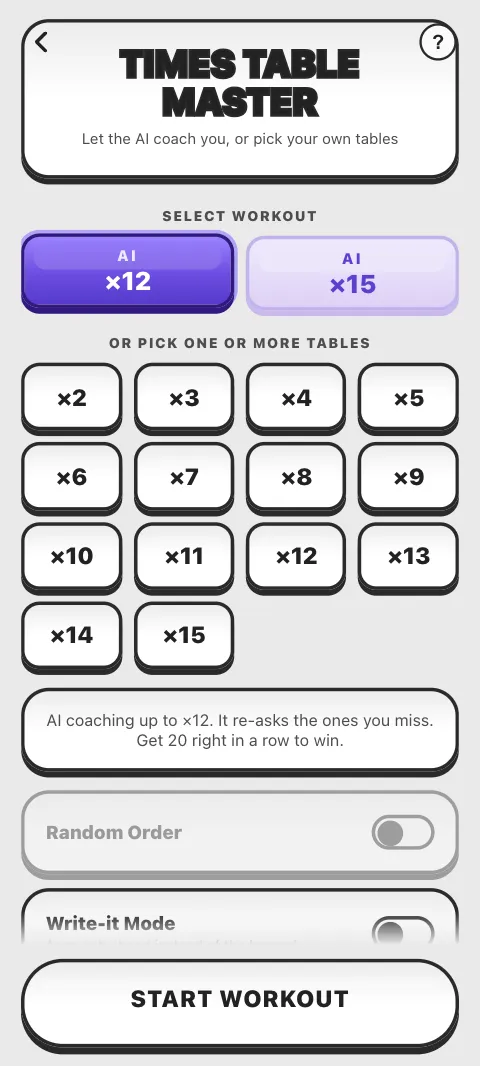
What are AI ×12 and AI ×15?
Two challenges under Select workout. AI ×12 asks any times fact up to 12 × 12, and AI ×15 goes up to 12 × 15. A fact you miss comes back later. To win, get 20 right in a row: the counter at the top shows how far you are, and a wrong answer starts the streak again. There is no penalty and no clock on screen, and when you win you see your total time.
The first time you open Times Table Master, AI ×12 is chosen for you. Picking a table clears the AI choice, and the other way round.
How does Write it work?
Switch on Write-it Mode to answer by hand instead of with the keypad. It works with your own tables and with the AI challenges. Write the answer on the squared paper with your finger, a stylus or a mouse, and Math Workout reads it. CLEAR wipes the paper, and the speaker button turns the pencil sound on or off. The first time, a finger shows you how.
Your handwriting is read on your device: nothing you draw is sent anywhere. For tips when it misreads a number, see Handwriting is not recognised.
Can I pause?
With your own tables, yes: the pause button or Esc opens the pause sheet, and the clock keeps running. In the AI challenges the back arrow opens QUIT WORKOUT?: KEEP PLAYING or QUIT.
Can I use a keyboard?
Yes, type the digits; Backspace deletes and Delete clears. In a Write-it round typed digits do nothing: draw the answer, or switch Write-it off on the Times Table Master screen.
Is Times Table Master free?
Yes: every table, both AI challenges and Write it. Each round counts toward your free workouts; Pro makes them unlimited.
Where do I see which tables I know?
On the Progress screen: its times table grid shows how well you know each fact. See Progress.
Was this article helpful?
Thanks for telling us.
Sorry it did not help. Tell us what was missing