

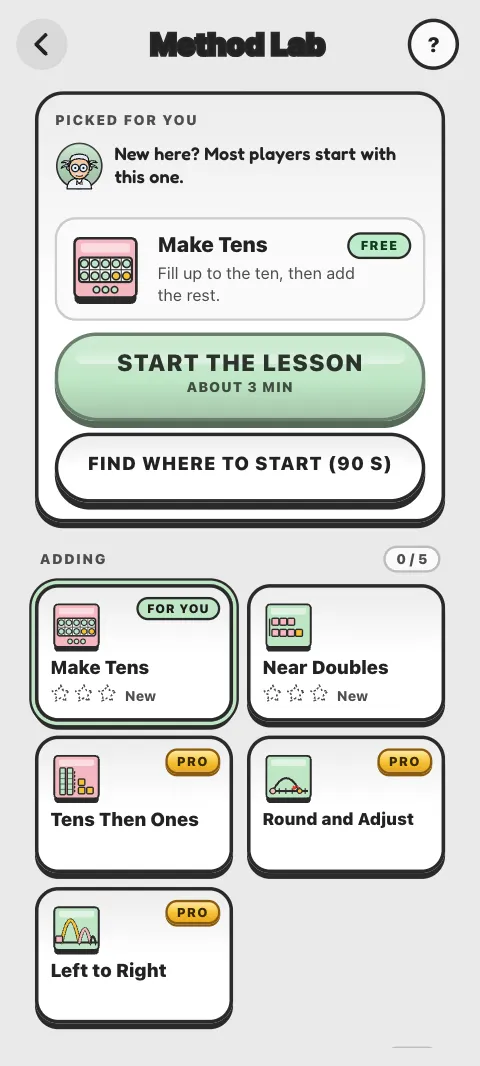
Method Lab teaches the tricks fast mental calculators use, one method at a time: how to make tens, use near doubles, multiply by 9 in a flash and more. Each lesson shows a worked example, then lets you practise with help that slowly fades away. The science: Method Lab.
Which methods are free?
Five of the 21 are free: Make Tens, Near Doubles, Count Up, The Nines Trick and Think Multiplication. The other 16, such as Round and Adjust, The Elevens Trick and Split and Share, come with Pro. Without Pro you can still watch the worked example of any method.
How does a lesson work?
A lesson takes about 3 minutes:
- A quick warm-up, and 5 sums done your own way, to measure your speed before.
- Watch: an animated worked example of the method.
- Try: finish the last step yourself, then practise with step-by-step help that fades away.
- Spot it: decide when the method helps and when it does not.
- Solo: a few sums on your own.
Get at least 4 of the 5 solo sums right first time, without peeking, for your first star.
What do the stars mean?
- One star: learned in the lesson.
- Two stars: passed the Mastery check, 10 sums: at least 9 right first time, and quick enough.
- Three stars: passed the Confirm check, which opens 20 hours later. Then the method is Mastered: it survived a night's sleep.
Prefer no time pressure? Turn on Relaxed check on a method's page to pass on accuracy alone. A mastered method fades over time and then shows Needs a polish, with a 1 minute polish to keep it fresh.
What is the Speed Split?
Your results show your Before and Now times on your own sums, measured on your device. A "faster" stamp appears only when you really are clearly faster than before; otherwise it says "About the same so far" or that it is too early to tell.
Where do I see my progress?
On the Method Lab screen, on each method's page, on the Method Lab card on the home screen, and in the Your methods card on the Progress screen. Method Lab also has its own badges.
Does Method Lab use my free workouts?
No. Lessons and checks never count toward your free workouts.
Can I use a keyboard?
Yes: type digits, Backspace deletes, Delete clears, Enter or Space continues, and Esc pauses.
Was this article helpful?
Thanks for telling us.
Sorry it did not help. Tell us what was missing