
The Progress screen shows what you have learned. Open it from its card on the home screen.
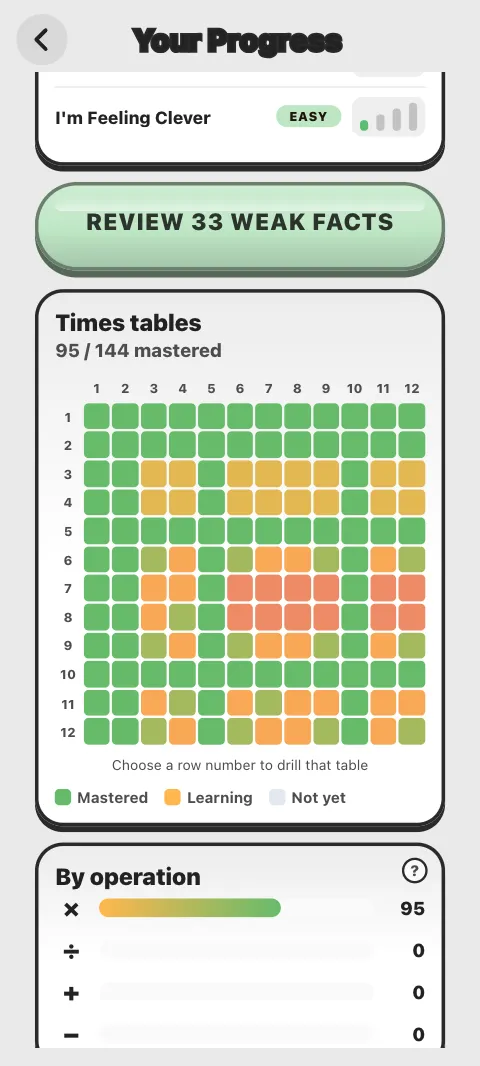
What does the Progress screen show?
From the top:
- your Mastery Level and how many facts you have mastered
- Your methods: your Method Lab stars
- the Math Adapt AI card, to set your level in each classic workout
- Review weak facts, when some facts need practice
- Your trouble spots, with See how for a quick method
- the Times tables grid
- By operation: facts mastered for ×, ÷, + and −
- the Trophy Room, with your badges. See Achievements
What does "mastered" mean?
Every fact, like 7 × 8, has a strength from 0 to 5. A right answer raises it, by more when it is quick; a wrong one lowers it. A fact is mastered at strength 4 or 5. Facts fade if you do not use them, so one you knew well last month can come back for review. Your Mastery Level rises as you master more facts.
How do I read the times tables grid?
It is a 12 × 12 grid, one square for each fact. The colour runs from red for a weak fact, through amber while you are learning it, to green once it is mastered; grey means not tried yet. Choose a row number to practise that whole table.
How do I practise my weak facts?
Tap the Review weak facts button (it shows how many). It gives you a short round of the facts that are weakest or due for a review. Or tap a row of the grid to drill one table.
Where does the data come from?
From your answers in the workouts, Times Table Master, World Challenge, Brain Age Check, Galaxy Run and Math Run. It is kept on your device, and saved to your account when you are signed in.
Why is my Progress screen empty?
It fills in as you play: "Play a few workouts and your mastery map fills in." If you had progress before, see My progress or scores are missing.
Was this article helpful?
Thanks for telling us.
Sorry it did not help. Tell us what was missing