

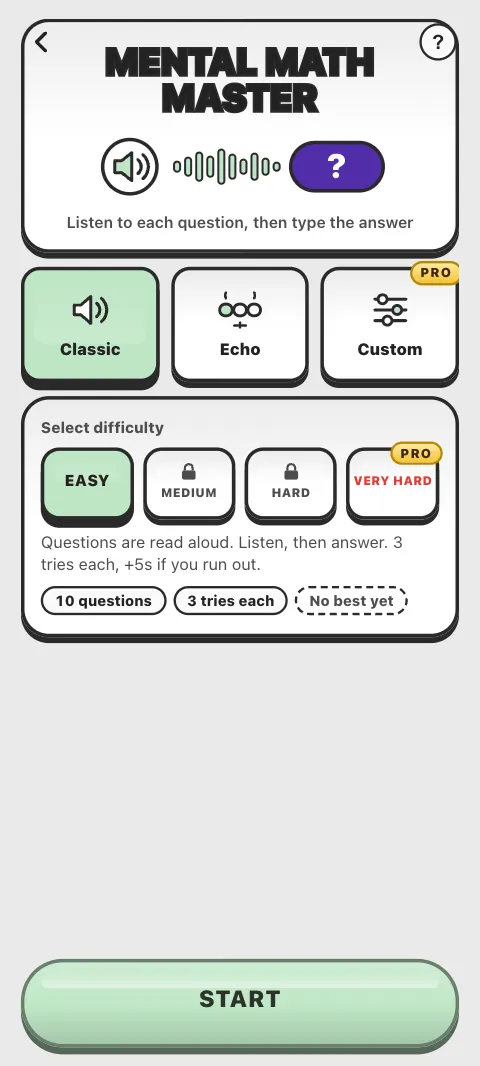
In Mental Math Master the sums are read aloud by your device's voice and not shown. You listen, work the answer out in your head and type it. Listening without seeing trains your focus and your memory for what you hear. The science: Mental Math Master.
How do I play?
- Tap Mental Math Master, choose a way to play and tap START.
- After the countdown, each question is read out: "7 plus 5". Type the answer.
- Missed it? Tap Hear again (or press Space or R).
A Classic round has 10 questions, with 3 tries each.
What happens when I get one wrong?
After the first miss, the question is read again. After the second, it is shown written on the card for one last try. After the third, Math Workout tells you the answer and adds 5 seconds to your time: the penalty is per question, not per wrong try.
What are Classic, Echo and Custom?
- Classic: levels Easy, Medium and Hard, plus Very Hard with Pro. Finish Easy in under 40 seconds, without running out of tries on any question, to open Medium; do the same on Medium to open Hard.
- Echo: you hear a few sums one after another and keep every answer in your head, then type them back in order. Each set you get right adds one more sum, from 2 up to 9. One miss ends the climb. Steady is free; the quicker pace is Pro.
- Custom (Pro): choose the operations, the size of the numbers, how many questions, the voice speed, and Hear once for an extra challenge.
What is Listen back?
After a Classic or Custom round, Listen back lists every question with its answer, and you can hear any of them again. After a miss it may name the likely slip, for example hearing 15 as 50, and give a quick method to try.
Which voice reads the questions?
Your device's own voice, in the app's language if your device has a voice for it. If it does not, the questions are read in English and the menu tells you so. If your device or browser has no voice at all, the questions are shown written instead. On an iPhone, the voice starts when you tap START.
How do I answer out loud with Say It!?
Say It! (in beta) lets you speak your answers instead of typing them. It is in the Android app, when the app is in English, on phones that can recognise speech. Switch on Say It! on the Mental Math Master screen and allow the microphone.
Each question is read first, then the microphone opens: say your answer. A clearly wrong number counts as a try; if it did not catch you, it asks again without costing a try, and after two misses it shows the keypad for that question. Type instead switches to the keypad for the rest of the round. Only the counts of right and wrong answers are recorded: no recording of your voice is kept or sent to us.
Can I pause?
No: the back arrow or Esc asks QUIT WORKOUT?, and the clock keeps running behind it.
Is it free?
Classic Easy, Medium and Hard, Steady Echo, Listen back and Say It! are free. Very Hard, the quick Echo and Custom practice are part of Pro.
I cannot hear the questions. What do I do?
Turn your device's volume up and check it is not muted. Mental Math Master uses your device's speech voice, so check it is set up in your phone's or computer's settings. See No sound or music.
Was this article helpful?
Thanks for telling us.
Sorry it did not help. Tell us what was missing